Batch Overlay
The overlay process in Revu lets you compare two or more PDFs by converting each document to a different color and stacking them on top of each other as layers in a new PDF. Each layer is transparent and blends with the layers below it. Where the colors are stacked directly over each other, they blend to create a darker color, making it easier to see which elements have changed and which ones have remained the same from revision to revision.
The Batch Overlay lets you create an overlay comparison for multiple files or a multi-page file in one batch process. The Batch Overlay feature is discussed here. There is also a non-batch version of Overlay.
 Overlaying Groups of Documents or Drawings
PDFs do not need to be open in Revu when the process is run. If a document is open in Revu, any changes resulting from the process will be made to the document, but the document will not be saved or checked in (if relevant); the user will need to save and check in the document manually. If a document is not open in Revu, and it is not checked out/locked by another user, changes will be applied and saved to the document automatically (without opening the document in Revu).
In most cases, Revu's auto-matching function will successfully match current sheets with their revisions, but in the event that a consistent naming convention is in place and the auto-matching function doesn't deliver satisfactory results, users can add their own syntax to the matching algorithm. If that doesn't work, or is not an option, manual correlation is always available.
-
Go to Batch >
 Overlay Pages. The Batch: Overlay Pages wizard appears.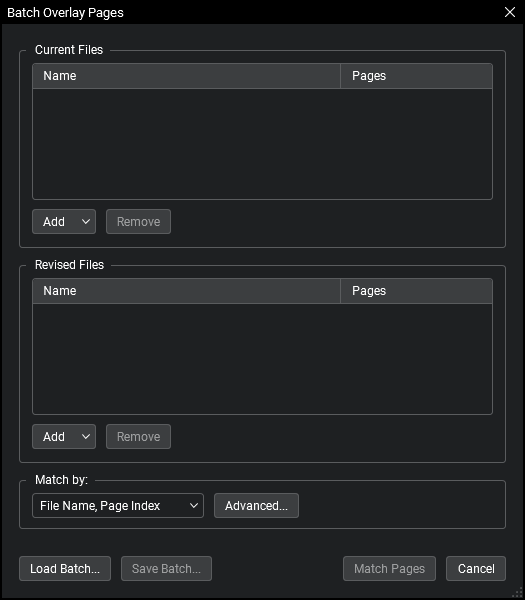
- Add PDFs to the Current Files and New Files lists by selecting the appropriate option from the corresponding Add menus:
- Files: Adds individual files from a network or local drive. Selecting this option will cause the Open dialog box to appear. Navigate to the appropriate location and select the desired files.
- Open Files: Adds all files currently open in Revu.
- Open Set: Adds all files contained in the current Set.
- Folder: Adds all files in a selected folder on a network or local drive, but not files contained in any of its subfolders. Selecting this option will cause the Select Folder dialog box to appear. Navigate to the desired folder and select it.
- Folder and Subfolders: Adds all files in a selected folder on a network or local drive as well as all files within any of its subfolders. Selecting this option will cause the Select Folder dialog box to appear. Navigate to the desired folder and select it.
- Select the method by which these documents should be matched from the Match by dropdown menu:
- File Name, Page Index: Automatically matches documents by file name, then by page index.
- Page Label: Automatically matches documents using predefined page labels.
Page Region: Uses the text found within user-defined regions to automatically match documents. To define the page region:
- Click Select. The dialog box disappears, replaced with a crosshair cursor.
Click and drag to define a region on the PDF. Generally speaking, the data in this region should be located in the same place on each PDF. When the region has been defined, the AutoMark dialog box appears.
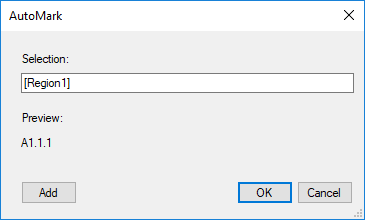
- To add another region, click Add. The AutoMark dialog box disappears, replaced with a crosshair cursor again. Click and drag to define another region. The AutoMark dialog box reappears with the new region added to the Selection field. There is no limit to the number of regions that can be added.
- Review the sample page label, as shown under Preview. If desired, click in the Selection field to add text before, after or between [Regions].
- When all regions have been defined, click OK. The AutoMark dialog box closes, replaced by the previous dialog box.
Note: AutoMark is most suitable for documents that are vector-based, are the same size and have the same registration. AutoMark might not work as expected if the pages are different sizes, if some of the pages are not searchable or if the scans are not properly registered.
- Manual Correlation: Skips the auto-matching process. Select this option to match documents manually.
-
For each of the Match by options except Manual Correlation, you can define an advanced filter for more control over the auto-matching process. To do so, click Advanced and enter the desired Match Filter. See Advanced Match Options for more information.
- At this point, you might want to save this batch for future use. To do so, click Save Batch. Files are saved in a BCX format and can be opened later.
- Saved batches can be opened by Batch Compare, Batch Overlay and Batch Slip Sheet.
-
Click Match Pages. The appropriate matching process is run (as determined by the Match by selection above) and the next page of the Batch: Overlay Pages wizard appears.
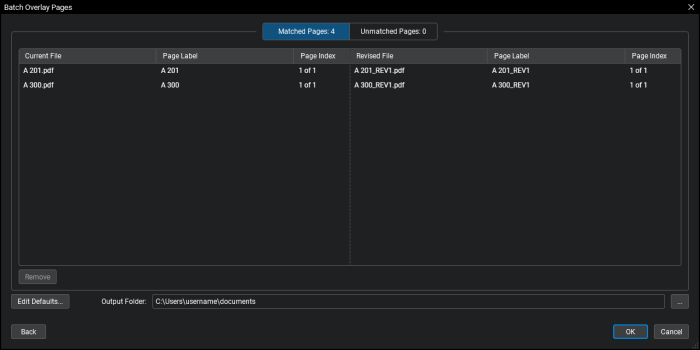
- Pages are arranged in matched pairs; pages in the same row are considered "paired" and will be overlayed. Drag and drop a page to move it to a different row (and pair it with a different page).
- To remove a page from either list, select it and click Remove.
- To change the default overlay settings, click Edit Defaults. See Editing Default Overlay Settings for more information.
- To change the folder in which the overlay documents will be saved, click the
 button to the right of Output Folder and select the desired folder.
 - To return to the previous screen, click Back.
- Click OK. The next screen of the Batch: Overlay Documents wizard appears.
If Manual Correlation was selected as the Match Pages By option on the previous screen and one or more pages are not paired, they are automatically discarded.
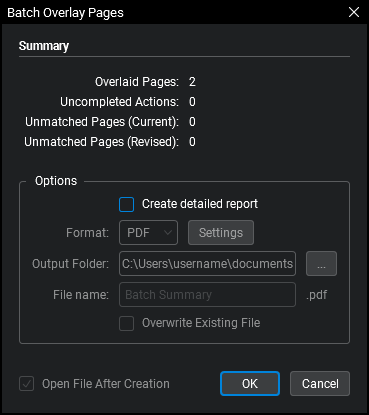
- Review the Summary information provided, which includes the pages that were overlaid and the name of the overlay document that was created for each page pair.
- To generate a report of the Summary information:
- Select Create detailed report.
- Select either PDF or CSV from the Format dropdown menu.
- To change the folder in which the report will be saved, click the button to the right of Output Folder and select the desired folder.
- Enter a name for the report in the File name field.
- To overwrite an existing file with the same name in the selected folder, select Overwrite Existing File.
- To open the file once it's been created, select Open File After Creation.
Click Settings to set additional reporting options. The options available vary depending on what kind of report is being generated:
PDF
Create Hyperlinks: When enabled, the report will include hyperlinks to the current, revised, and unmatched pages
- Stamp Date and Stamp Time: When enabled, adds that information to the footer of the report.
- Page Size and Orientation: Sets the page size and orientation of the report.
CSV
- Create Hyperlinks: When enabled, the report will include hyperlinks to the current, revised, and unmatched pages.
- Include Column Headers: When enabled, the file will include automatically generated column headers in the comparison report.
- Click OK.
Advanced Match Options
Advanced Match Options lets you define a custom Match Filter that is used to precisely match pages during the auto-match process.
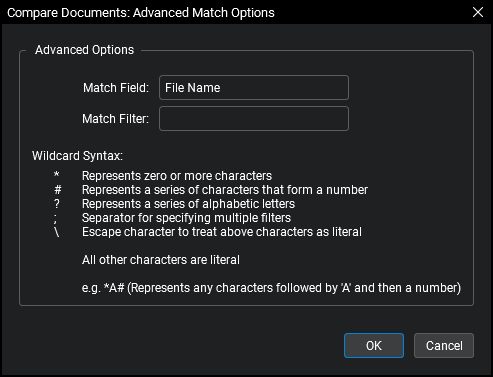
Wildcard Syntax:
* Represents zero or more characters that are not a number # Represents a series of characters that form a number ; Separator for specifying multiple filters ? Represents a series of alphabetic letters \ Escape character to treat above characters as literal All other characters are literal.
Note: An assumed * wildcard always precedes the string. For instance, A#;C# is implied as *A#;*C#.
Note: A space is considered a literal character. Do not include a space after the semicolon or else the filter will take that space into account as well.
Editing Default Overlay Settings
The default overlay settings in Revu are changeable. To access the default settings, Overlay Pages and click Edit Defaults on the Batch: Overlay Pages
-dialog-box.png)
- Appearance: Sets the default line color of Layers
- Default Background: Set the default background color. The default is transparent. To change the default background color, click the color box and select the desired color.
- Default Blend: Determines how the color of overlapping elements are treated.
- Default Opacity: Sets the transparency of the content in the Layer. Range is from 0% (fully transparent) to 100% (fully opaque).
- Advanced Color Shading: When enabled, the overlay process will employ advanced shading methods when blending colors, allowing for greater detail in the resulting drawing.
- Include Flattened Markups: When enabled, overrides the default behavior that ignores markups that have been flattened as "recoverable".
- Position:
- Rotation: Sets the default rotation (in degrees) of the Layer. Range is from 0 to 360.
- Scale: Sets the default scale of the Layer, where 1.00 is equal to 100% (so, for example, a 75% scale should be entered as .75 while a 125% scale should be entered as 1.25). Select Scale Adjustment to enable.
- Offset X & Y: Sets the default offset position of Layer along the X and/or Y axes.