Error: "This request is not permitted from this version of your client software."
Applies to:
- Revu 21
- Revu 20
Problem
While attempting to access Bluebeam Studio, you receive an error message:
"This request is not permitted from this version of your client software."
Solution
If you're trying to access Bluebeam Studio on an international server, Revu 20 or Revu 21 is required. For more information about finding your version number, please see this article.
If you're trying to access Studio on the US server and receive this message, please contact support.
Find your server
To confirm which server you're accessing, follow the steps below for your version of Revu.
- Open Revu.
- Select Revu >
 Preferences.
 - Select
 Studio from the left-hand menu.
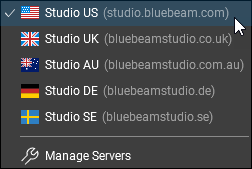
 - Select the flag icon to open the dropdown menu of Studio servers. A checkmark will appear next to the selected server.
Troubleshooting
Revu 20
Revu 21
Error Message
Studio
While attempting to access Bluebeam Studio, you receive the error message, "This request is not permitted from this version of your client software." Read about the causes for this issue and how to connect to the correct server.