Tutorial: Start a Studio Project workflow
Whether you're starting up a Studio Project for the first or hundredth time, there are some set-up steps you need to take. If you don't already have an account on a Studio Server (either one your organization is running or one of Bluebeam's open, cloud-based servers), you need to establish one first. If you've ever signed into a Studio Project or Session before, you already have one of these (see Studio FAQs for information about resetting your password, if needed). For more information about creating a Studio account, see Manage Studio accounts for more information. Then, it's a matter of creating the Project and uploading the initial document set you want to share, configuring its settings and permissions, and inviting guests to the Project.
 Start a Studio Project
While access to Studio Project PDFs is supported on Bluebeam on an iOS device, new Studio Projects can only be started in Revu for Windows. You need a validated Studio account to create a Studio Project. If you have not established one yet, do that first.
During the creation process, you will be given an opportunity to upload Project files. If you're not quite ready for that yet or if you need to upload additional documents later, you can do so.
To start a new Studio Project, follow these steps:
- Go to Window > Panels > Studio or press Alt+C to open the Studio panel.
- On the Studio panel toolbar, select Project. Any current Projects are listed.
- Go to
 Add > New Project.
 If you have not already created an account, the Create Studio Account dialog box appears instead. Create a Studio Account before proceeding.
-
In the New Project dialog, enter a name for the Project and select OK. The new Project is added to the list on the Studio panel and an empty Project tab opens in the main workspace.
Project names cannot contain any of the following characters: , <, >, |, :, *, ?, \, /
-
To add initial Project files, select from the following options:
- New Folder: Creates a new folder in the root directory of the Project or a subfolder in the selected folder (depending on what you right-clicked). In the New Folder dialog, enter a name for the folder and select OK .
- Upload Files: Uploads individually selected files to the root directory of the Project or to the selected folder (depending on what you right-clicked). In the Upload Files dialog, select Add, and specify whether to upload either Files (by navigating to the desired files), Open Files (which automatically adds all PDFs currently open), or Open Set (which automatically opens the Set currently open).
- Upload Folder: Uploads the contents of a folder to the root directory of the Project or to the selected folder (depending on what you right-clicked). In the Select a folder to upload dialog, navigate to and select the desired folder, and then select Select Folder.
This option recreates the selected folder in the Project automatically and uploads the contents into that folder.
In addition to the buttons shown in the workspace of a new or empty Project, these options are also available by selecting Add on the Project tab.
Additional files and folders can be added to the Project later as well.
Configure Project Settings
By default, no other users are granted access to a new Project and permissions for any who are invited are very limited. You can change these conditions by configuring the Project Settings.
Set user access in the Studio Project
Adding a user to a Project will allow them access (for Projects that are set to restrict attendee access) or deny them access (for Projects that are not set to restrict attendee access). Restricted attendee access is discussed in more detail below.
To add a user to the Project, follow these steps:
-
When in the Project, select
 Project Settings on the Project tab. The Project Settings dialog appears.
-
Select the User Access tab. Previously added users will appear in the list.
- To add new, individual users, select
 . In the Add Email Address dialog, enter the user's email address and select OK.
 - To add the users in a Group, click
 . In the Select Groups dialog, select the desired group and select OK. All the users in that Group are automatically added.Only the Project owner can use Groups to add users to the Project.
 - By default, all users added to the User Access tab automatically have their Access set to Allowed. To block access to a specific user (for example, one brought in with a Group that should not have access to this specific Project), select the desired user and select Block. The Blocked Users dialog appears: leave the default option Block access (reversible) - you can re-invite this user later selected and select Block 1 User.
- To restrict access to this Project to only those users listed on the User Access tab whose Access is set to Allowed, select Make this Project private.
The relationship between this setting and a user's Access status (either Allowed or Blocked) lets you set up the equivalent of a "white list" or a "black list" and merits some further explanation:
- When Make this Project private is selected, only users listed here on the User Access tab whose Access is set to Allow will be able to access this Project. This is the equivalent of a "white list."
- When Make this Project private is not selected, any user can access the Project except for those listed here on the User Access tab whose Access is set to Blocked. This is the equivalent of a "black list."
- Select OK.
Set permissions in a Studio Project
Permissions define what actions users can take in the Project. Permissions can be defined for groups as well as individual users.
-
When in the Project, select Project Settings on the Project tab. The Project Settings dialog appears.
-
Select the Permissions tab.
The default group, Attendees, will be shown, as well as any other users or Groups that have been previously added. The Attendees group applies to all users in the Project and its initial permission settings are configured when the Project is created. It cannot be deleted. Most permissions for the Attendees group are set to Blocked when the Project is created; a recommended best practice is to give additional permissions to specific users and Groups rather than allow greater access to the Attendees group.
- To add individual users or Groups:
- Select .
In the Add Users/Groups dialog, select the desired user or group and select OK. Only the owner's Groups are shown as they are the only ones that can be used in the Project. By default, when users and Groups are added, they inherit the permissions of the Attendees group.
If you are the Project owner and would like to create a new Group for this Project or change the membership of one currently being used, select
 Manage Groups. See Studio Groups for more information about creating and managing groups. Users with Full Control permissions can also use Manage Groups to manage their own groups, but they will not be able to use those groups in this Project nor will they be able to alter any of the owner's Groups.
When creating Groups, keep in mind that Revu will allow somebody to be in multiple Groups within the same Session or Project; when this occurs, that person's permissions will default to whichever is the most restrictive. As such, adding somebody who is already in a Group to a second Group might not have the desired effect, either by not granting expected permissions (because the first Group's are more restrictive) or by imposing undesired restrictions (because the second Group's are more restrictive).
- Select
- To change the permissions for a user or Group:
- Select the desired user or Group in the Users/Groups list.
- Select the desired permission in the Applied Permissions list.
- Select a permission setting from the dropdown list.
- When defining permissions for the Attendees group, the options are Blocked or Allowed.
- When defining permission for all other users and Groups, then options are blank, Blocked or Allowed. Selecting blank will cause the user or Group to inherit the permission defined for the Attendees group.
- The Full Control permission is powerful and setting it to Allowed gives the user or Group of users administrator powers. The effects of this are:
- All permissions for administrators are set to Allowed.
- Administrators can rename the Project.
- Administrators can delete the Project.
- Administrators can manage user Access.
- Administrators can manage Permissions for other users.
- Administrators have full permissions to any folder, regardless of the folder's default permissions.
There are some limits on what administrators can do, however:
- Administrators cannot block the Host.
- Administrators do not have access to the Host's (or any other administrator's) Groups.
- To remove a user or Group, select them and select
 .
. - Select OK.
Understanding Permission hierarchies
When setting permissions, there are two sets of hierarchies to keep in mind: Permission Sets and Permission States.
- A Permission Set describes how a user came to have their permissions: Were they assigned to the user specifically (Individual permissions)? Did the user pick them up by virtue of belonging to a certain Group (Group permissions)? Or did the user default to the general permissions because neither of the previous two conditions were met (General permissions)?
- A Permission State describes whether the user is permitted to perform a certain task (Allowed) or not (Blocked). For individual users and Groups, permission states can either be specifically selected (Explicit) or they can be left blank, causing them to default to whatever the corresponding permission state is for the Everyone group (Inherited).
Permission States work within Permission Sets and generally come into play only to resolve conflicts that arise when a user is a member of two or more Groups that have conflicting permissions (see examples 4 and 5 below for further illustration). It is generally recommended that people not be added to multiple Groups, but in the event that it is necessary, Hosts and administrators should coordinate to ensure that the proper permissions are granted.
Hierarchies
The hierarchies are:
Permission Sets
- Individual permissions (that is, those set up for a specific user) have primary importance.
- Group permissions (that is, those set up for a Group you have created) have secondary importance.
- General permissions (that is, those set up for the default Everyone group) have the least importance.
Permission States
- Explicit Blocked (that is, a permission that is specifically set to Blocked) has primary importance.
- Explicit Allowed (that is, a permission that is specifically set to Allowed) has secondary importance.
- Inherited State (that is, any permission—whether it is Blocked or Allowed—that is inherited from the default Everyone group) has the least importance.
Examples
With these hierarchies in mind, here are a couple examples that illustrate how a user's actual permissions are determined:
- User Alice has individual permissions set up and the Send Invitations permission is set to Blocked. User Alice also belongs to Group A and the permissions for Send Invitations for Group A is set to Allowed. Alice will not be able to send invitations to the Project.
- Her individual permissions overrule the Group A permissions.
- User Bob has individual permissions set up and the Send Invitations permission is set to Allowed. User Bob also belongs to Group A and the permissions for Send Invitations for Group A is set to Blocked. Bob will be able to send invitations to the Project.
- His individual permissions overrule the Group A permissions.
- User Charlie has individual permissions set up and the Send Invitations permission is set to Allowed. User Charlie also belongs to Group A and the permissions for Send Invitations for Group A is set to <blank>. The Send Invitations permission for the Everyone group is set to Blocked. Charlie will be able to send invitations to the Project.
- His individual permissions overrule the Group A permissions.
- User Alice does not have individual permissions set up, but she is part of Group A that has the Send Invitations permission set to Allowed and she is also part of Group B that has the Send Invitations permission set to Blocked. Alice will not be able to send invitations to the Project.
- The explicit Blockedpermission from Group B overrules the explicit Allowed permission from Group A.
- User Bob does not have individual permissions set up, but he is part of Group A that has the Send Invitations permission set to Allowed and he is part of Group B that has the Send Invitations permission set to <blank>. The Send Invitations permission for the Everyone group is set to Blocked. Bob will be able to send invitations to the Project.
- The explicit Allowed permission from Group A overrules the inherited Blocked permission from Group B.
Uploading Project Files
You can create new folders in the Project, select individual files to upload, or upload an entire folder and its contents if you have the appropriate permissions.
To add files to a Project, double-click the Project to open its Project tab and select the desired option from the toolbar at the top:
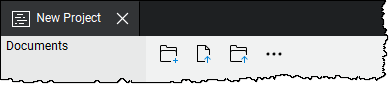
- New Folder: Creates a new folder in the root directory of the Project or a subfolder in the selected folder (depending on what you right-clicked). In the New Folder dialog, enter a name for the folder and select OK .
- Upload Files: Uploads individually selected files to the root directory of the Project or to the selected folder (depending on what you right-clicked). In the Upload Files dialog, select Add, and specify whether to upload either Files (by navigating to the desired files), Open Files (which automatically adds all PDFs currently open), or Open Set (which automatically opens the Set currently open).
- Upload Folder: Uploads the contents of a folder to the root directory of the Project or to the selected folder (depending on what you right-clicked). In the Select a folder to upload dialog, navigate to and select the desired folder, and then select Select Folder.
This option recreates the selected folder in the Project automatically and uploads the contents into that folder.
Invite users to the Project
Inviting somebody to a Project automatically adds them as an Allowed User in the Project Settings (see "Setting User Access in the Studio Project" above for more information about User Access). In addition, the invitee is also sent an email containing information about the Project as well as a link allowing them to automatically connect to the Project.
To invite a user to the Project, follow these steps:
-
On in the Project tab, right-click the root folder and select
 Invite. The Project Invitation dialog appears.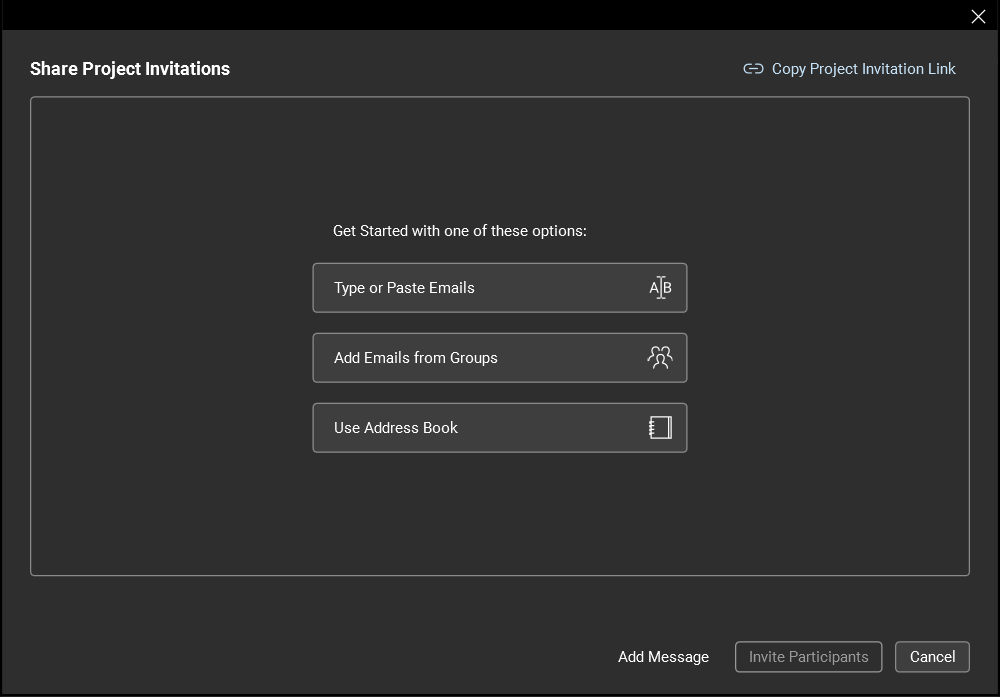
- There are a few ways to add emails to the invite:
- Type or Paste Emails: Select this option to directly enter emails or copy and paste a list from another source. Lists can be separated by commas, semicolons, spaces, have names in brackets in between them, and be a mixture of different formatting styles; Revu will analyze the list and extract recognizable email addresses.
- Add Emails from Groups: Select this option to add emails from existing Studio Groups. Entire Groups can be selected, adding all the users within that Group, or users can be selected individually from one or more Groups.
- Use Address Book: Select this option to add emails from your email application's address book. The email application must be MAPI compliant for Revu to access its address book. The address books from web-based email like Gmail and Yahoo cannot be accessed.
-
After adding email addresses from a source, the Invite Users dialog displays a list of proposed invitees sorted alphabetically and by domain.

Review this list for accuracy and completion. Email addresses can be removed and others added:
- To remove an email address, select it and select Remove. To remove all the email addresses under a certain domain, select the associated
 Remove Domain icon. You will be asked for confirmation when removing a domain.
 - To add more email addresses, select one of the options from the Add Emails menu. Each of the methods described above is available.
- To remove an email address, select it and select Remove. To remove all the email addresses under a certain domain, select the associated
- When you're satisfied with the invite list, select Invite Participants. Emails are sent to each address in your invite list from the Studio server.