Signatures panel
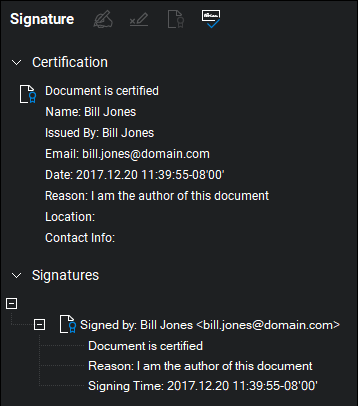
The  Signatures panel shows certifications and digital signatures placed on a document (including invisible signatures from services such as Docusign or digital IDs with embedded timestamps) as well as tools for signing and certifying documents. Users are prompted to open it whenever a PDF that has been certified or digitally signed is opened.
To show the Signatures panel, go to Window > Panels > Signatures or press ALT+4.
If the current document has been certified or digitally signed, it will be shown on the Signatures panel. The validation status of each digital signature is shown. Additionally, certifications can be cleared from the Signatures panel.
To view the details of a signature, select the toggle to its left.
 Signatures panel toolbar
The Signatures panel toolbar contains several tools for adding and managing digital signatures and certifications.

 Sign Document: Creates a signature field and automatically attempts to sign it.
 Add Signature Field: Creates a signature field without trying to sign it.
 Certify Document: Certifies a document for authenticity.
 Validate Signatures: Attempts to validate all signatures in the document.