Radierer-Werkzeug
Das Radierer-Tool entfernt Stift- und freie (Stift-Modus) Markierungen des Textmarkers.
 Stift- und Stiftmodus-Textmarker-Markierungen radieren
- Wählen Sie das Radierer-Werkzeug mit einer der folgenden Methoden aus:
- Gehen Sie zu Werkzeuge > Markierung >
 Radierer.
 - Wählen Sie auf der Symbolleiste „Text“aus.
- Drücke Umschalttaste+E auf der Tastatur.
- Gehen Sie zu Werkzeuge > Markierung >
- Wählen Sie den gewünschten Radierertyp aus der Radierer-Schwebeleiste aus, die erscheint (siehe Die Radierer-Schwebeleiste unten für weitere Informationen zu den verschiedenen verfügbaren Radierern).
- Ziehen Sie über eine Markierung. Elemente, die gelöscht werden, werden ausgegraut. Um die Löschung abzubrechen, drücken Sie ESC auf der Tastatur.
- Freigeben zum Löschen der Auswahl.
Symbolleiste „Radierer“
Wenn der Radierer ausgewählt ist, erscheinen verschiedene Radierer-Werkzeuge in der Eigenschaften-Symbolleiste.

-
Die
 kleinen,
  mittleren und
  großen Radierer bestimmen die Größe des Radierkopfs beim Entfernen der Stift- und Textmarker-Markierungen.
 -
Der
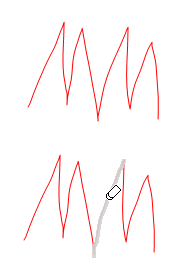
 Strichradierer entfernt Liniensegmente, wie im folgenden Beispiel gezeigt.
 -
Der
 Anmerkungsradierer entfernt Teile der Stift- oder Textmarker-Markierung, die durch eine einzelne, unabhängige Aktion erstellt wurde.
Ein Liniensegment wird entfernt, wenn der Strichradierer verwendet wird.