Admin Preferences
The Admin Preferences contain Revu administration settings. Select Admin from the Preferences dialog to view or modify these preferences.
To open the Preferences dialog box, go to Revu >  Preferences.
 Options
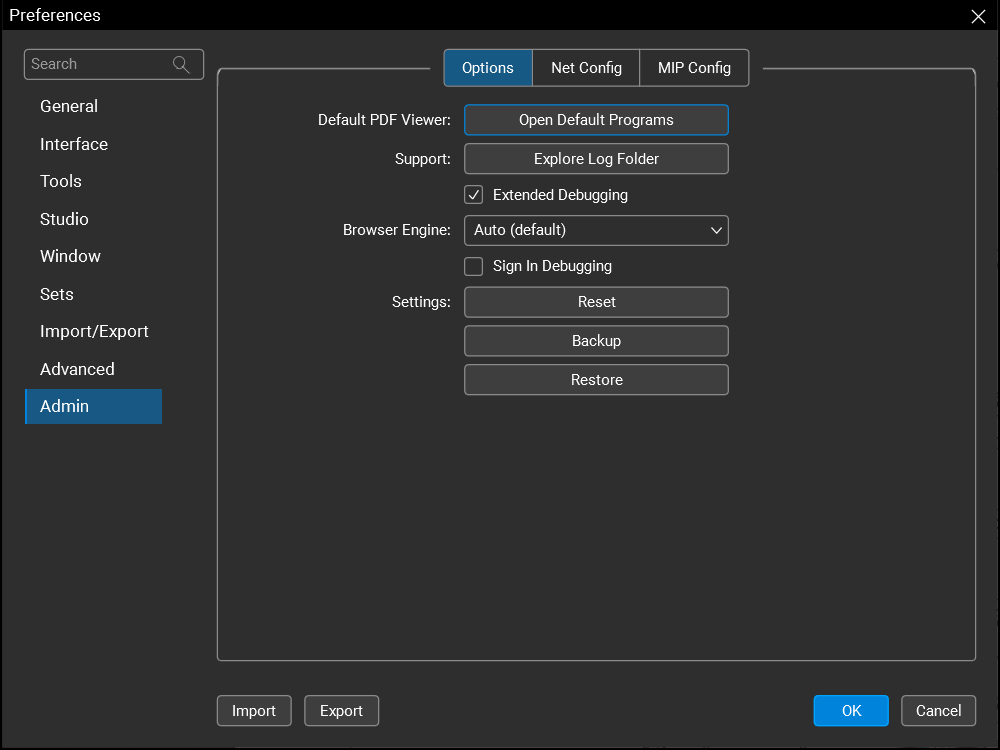
Default PDF Viewer: Select Open Default Programs to open the default programs control panel for your operating system where you can set the default application for PDF files.
Support: Select Explore Log Folder to open the folder with your Revu logs.
Extended Debugging: When enabled, additional debugging data is kept in the log files. Revu must be restarted before changes to this setting will take effect.
Browser Engine: Revu uses one of the following as the browser engine:
-
Auto (default): The latest version of WebView2 available on the system.
-
System: The version of WebView2 your system has installed (this is typically the latest version Microsoft Edge has installed).
-
Embedded: The version of WebView2 that comes bundled with Revu.
Sign-In Method: This setting allows you to sign in using your default browser, rather than the Revu internal browser.
-
Embedded Browser (Default): The version of WebView2 that comes bundled with Revu.
-
System Browser (US Only): The default web browser on your computer. You can use this setting if you sign in to the US region and your organization has specific security and user management requirements for your preferred default external browser to be used.
Settings:
-
Reset: Resets Revu to its default settings. The existing settings are automatically backed up.
-
Backup: Saves current Revu settings.
-
Restore: Restores saved Revu settings.
Net Config

Stamps: Shows the path to the default Stamps folder. Select Browse to change this folder.
Email Templates: Shows the path to the default Email Templates folder. Select Browse to change this folder.
MCP
Claude for Windows: Select to connect Revu and Claude MCP.
GitHub Copilot CLI: Select to connect Revu and GitHub Copilot CLI.
ChatGPT (Codex): Select to connect Revu and ChatGPT.
AnythingLLM Desktop: Select to connect Revu and AnythingLLM.