Revu menu
The Revu menu contains tools for managing the usage of the application. It is accessed by selecting Revu on the Menu bar.
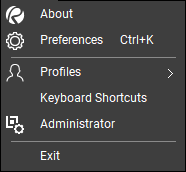
 About: Shows the Bluebeam Revu dialog box containing information about the installed application, including version and serial number.
 Preferences : Opens the Preferences dialog to customize Revu settings.
 Profiles: Contains a list of profiles currently available. The current profile is checked; select a profile to make it active. Also contains tools for saving and managing profiles.
Keyboard Shortcuts: Launches the Keyboard Shortcuts dialog, from which you can review and customize the keyboard shortcuts used by Revu.
 Administrator: Launches the Bluebeam Revu Administrator application.
Exit: Closes the application.