Bluebeam Studio security overview
Applies to:
- Revu 21
This document addresses questions we receive from Bluebeam Studio users regarding document and system security, access control, and disaster recovery.
Accessing Studio
To participate in Studio Sessions and Projects, you must enter your Bluebeam ID (BBID) and password. To learn how to create a BBID, visit this article.
Studio server connections are initiated by Revu clients, but the system doesn't send inbound connection requests back to the client. Primary communication and transmission of files, markups, and other rich data uses the HTTPS protocol, while encryption and authentication use the Transport Layer Security (TLS) protocol.
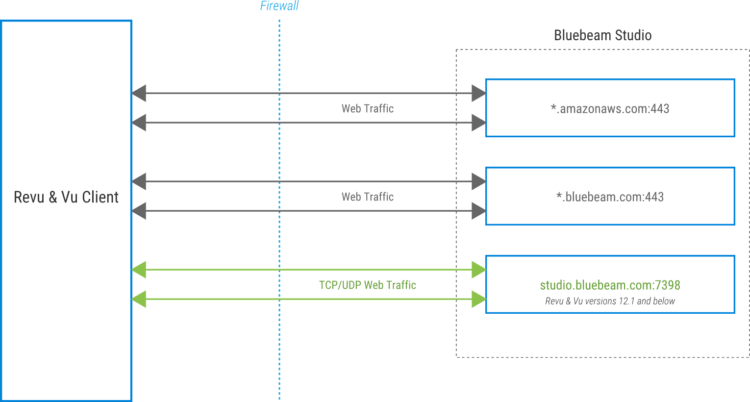
Firewall requirements
See Whitelist Bluebeam solutions by domains or IP addresses for the domains and ports used by Revu, Studio, and Bluebeam on web and mobile. If you're only accessing a specific region, whitelist only the necessary domains specific for that region and the required global services.
Studio-related email domains
Bluebeam uses the following domains to communicate with users for support, licensing and Studio-related information. Whitelisting the following domains may be necessary to ensure successful email transmission:
US environment
@bluebeam.com
@bluebeamops.com
@bluebeam-support.com
CA environment
@bluebeam.ca
UK environment
@bluebeamstudio.co.uk
AUS environment
@bluebeamstudio.com.au
DE environment
@bluebeamstudio.de
SE environment
@bluebeamstudio.se
User authentication and access control
The protocols described in this section are implemented for secure user authentication and access control.
Certificate requirements
Connections to Studio environments, such as studio.bluebeam.com, are encrypted using a Public Key Infrastructure-based (PKI) SSL certificate, issued by Amazon Web Services Certificate Authority (AWS CA).
You can view the certificate by going to https://studio.bluebeam.com and clicking the icon to the left of the URL in your web browser address bar.
Password requirements and storage
All passwords must be between 8 and 32 characters and contain the following:
-
At least one uppercase letter
-
At least one lowercase letter
-
At least one number
-
At least one special character, such as
!@#$%^&*.
Passwords are hashed prior to storage using a one‑way strong hash algorithm with salt.
In addition, an algorithm locks accounts for a 5‑minute period after five successive sign-in attempts using an incorrect password. Sign-in failures are logged, and our operations team is alerted if the quantity rises above a preset level.
Data and system security
The measures described below were implemented to address data and system security concerns.
Infrastructure and data storage

Studio is hosted on Amazon Elastic Compute Cloud (EC2) managed by Amazon Web Services (AWS).
The Studio infrastructure consists of application servers that serve Revu clients on Windows, iOS, and Android as well as a backend processing system and a data tier.
Studio data and files are stored in Amazon Simple Storage Service (Amazon S3) and relational databases. Actual Project and Session documents reside on Amazon Simple Storage Service (Amazon S3) servers.
Studio has multiple isolated environments for data residency located in the following regions:
-
US
-
Canada
-
UK
-
Germany
-
Australia
-
Sweden
The database infrastructure and Amazon S3 buckets containing customer data aren't shared among environments. All Studio environments can be accessed from anywhere in the world.
SLAs for Amazon EC2 and Amazon S3 can be found in following locations:
Data protection
In addition to encryption of all server backups and developer hard drives, all documents are automatically encrypted when uploaded to a Studio Session or Project using Revu, as described below.
Encryption uses an AWS Key Management Service (KMS) key ID.
All data is encrypted at rest (AES-256 encryption) and in transit. Data transfer is encrypted in transit via TLS1.2 between the Revu client and Amazon S3. In the server environment, files are encrypted in the Amazon S3 service. Database backups are stored on encrypted volumes.
System security
We've ensured that all environments perform in the same manner and are subjected to the same network policies and restrictions by building them with a validated and tested "template." Once deployed, the steps and policies listed in this section are in place to provide additional security and consistency across the infrastructure.
Controlled administrator access
Only a select group of engineers have administrative rights within the Studio infrastructure, and management console access is controlled via multi-factor authentication (MFA).
Change control
All system changes and enhancements are documented and must undergo testing and approval by our DevOps and Security teams before implementation in the production environment.
Logging
Application and system security logs are retained for a maximum of 30 days.
Vulnerability assessment and remediation
We've implemented a comprehensive vulnerability assessment and remediation process to address any security issues that may arise. These measures include antivirus protection on all servers, proactive system patching policy, and file integrity monitoring (which detects unauthorized changes to the systems).
Applications with a web component are scanned prior to and after deployment to the production environment.
All production systems are scanned for infrastructure vulnerabilities on a recurring basis and are patched accordingly.
All production asset additions and modifications are restricted to the DevOps team and follow change control procedures. The DevOps team leverages AWS tools to maintain asset inventory.
Infrastructure and system monitoring
To ensure a steady state of operations, a comprehensive monitoring and alert system is in place for the following:
- Server infrastructure: CPU, memory, disk space, and uptime
- Applications: errors, performance degradation, and uptime
- Network performance: usage and bandwidth, server response time, throughput, and web requests
System maintenance
Regular maintenance tasks and emergency maintenance are performed in accordance with our established change control process.
Disaster recovery (DR)
The Studio DR strategy uses multiple AWS Availability Zones (AZs). This strategy focuses on having a highly available and distributed system to minimize risk associated with disruptions and disasters.
This section describes the contingencies we've put in place to handle infrastructure failures.
Infrastructure redundancy
Full redundancy is in place for all Studio application servers. If a primary server fails, all traffic is automatically switched to a secondary server.
Application servers run in a cluster behind a load balancer. The Studio database uses "AlwaysOn" to provide high availability (HA). DNS redundancy is provided by Amazon Route53.
Additionally, Studio infrastructure is deployed across multiple AZs in a multi-AZ architecture within the AWS region.
Backup protocol
Full backups of the databases are performed on a daily basis. The backup files are stored away from production servers, and their integrity is regularly inspected.
PDF files are stored in AWS S3, which provides highly durable storage and file versioning.
Bluebeam does not keep an infinite number of backups with all previous states of the database represented. In general, the backup only contains the last 24 hours.
System and Organization Controls (SOC) 2 compliance
The Bluebeam SOC Report is an independent, third-party examination report that demonstrates how Bluebeam achieves key compliance controls and objectives. Bluebeam undergoes an annual SOC 2 audit performed by an external and independent third-party assessor to verify the implementation and effectiveness of our security controls. Our report covers the SOC 2 Trust Services Criteria of Security and Availability.
To view a copy of the report, see the Trust Center for all Nemetschek Group companies.