Length measurement
The Length measurement tool lets you draw a single straight line measurement on your PDF. You can add depth or slope values to the measurement if needed.
If you want to measure several segments and see the total length, use Polylength Measurements. If you want only the total length of a multi-segment line, use Polylength Measurements. To add a line without a measurement, use the Dimension Tool.
Before you start, set the page scale for your document first. If you try to place a measurement on a page without a scale, you'll be prompted to set one.
 Place a length measurement
-
Go to Tools > Measure >
 Length. Or, select Length on the Measurements panel.
 -
To change the units for any dimension, select the desired measurement units from the dropdowns in the Measurement Properties section of the Measurements panel. Measurements can be taken in units different from those used to set the page scale.
You can also set these from the Units dropdown in the Properties toolbar.
Changes you make to properties will apply to all new measurements until you switch tools (for example, when you place a different type of measurement). - Click the two endpoints on your document to set the length.
When you've set the page scale, a preview of key measurement values appears in the lower-right corner as you place measurements to ensure precision. Hide or recall it as needed by selecting the X or the measure icon.
- Hold Shift to draw lines at horizontal, vertical, or 45° angles.
- Length arrows will automatically appear inside
 extension lines when there is enough room. If not, arrows will move outside the lines
 .
.
- Change properties (Subject, Label, units, Slope, Depth) after placing the measurement by selecting it and using the Measurements panel.
Remove a length measurement
To remove markups from your PDF, do one of the following:
- Select the markup on the PDF or from the Markups list.
- Press Delete on your keyboard, or right-click and select
 Delete.
Add an action to a length measurement
You can add an action to almost any markup. Right-click the markup and select Edit Action.
Icon indicators in Markups
Markups may display indicator icons below and to the right of the markup (or grouped markups). These include:
 Action: Shows that an action is defined for this markup. Select to trigger the action.
 Capture: Shows that the markup has embedded media (typically an image or video). Select this icon to open a preview window.
 Reply: Shows one or more replies exist in the Markups list. Hover to preview replies or select to jump to the markup's entry. Turn off the ability to see reply indicators in the View menu.
Resize or adjust a length measurement
Select a markup to reveal its control handles. Each handle controls a different aspect of size and orientation.
Resize the markup or change its angle: Drag the appropriate yellow handle. Hold Shift while dragging to force the markup to a horizontal, vertical, or 45° angle.
Adjust the height of the markup: Drag the middle (caption) control handle.
Move only the caption: Drag the caption while holding down Shift. To return the caption to its default position, right-click it and select Reset Caption Position.
Move the entire markup: Drag any part except the control handles.
Rotate the caption: Drag the orange handle directly over the caption. To rotate the caption 180°, right-click the markup and select Flip Text.
See Editing Markups for more information.
Change a length measurement's appearance
You can adjust the appearance of your measurement, including line and fill color, line width and style, opacity, and font options for the caption.
To change the appearance of a Length measurement, select the markup and select the Properties panel. Go to Window > Panels > Properties to show the Properties panel if it is hidden. Several properties will also be available on the Properties toolbar when the markup is selected.
Appearance Properties
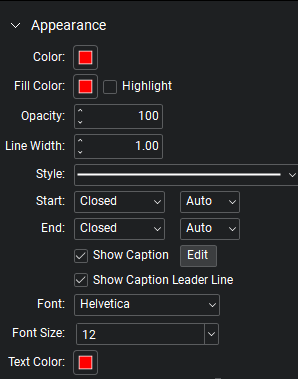
Color: Sets the line color.
Fill Color: Controls the fill color of the endpoints.
Highlight: Makes the fill color and line transparent so underlying content shows through.
Opacity: Sets opacity level of the line and endpoints, from 0 (invisible) to 100 (opaque).
Line Width: Sets the line thickness in points. A setting of 0 effectively renders the line invisible.
Style: Determines the line pattern. In addition, there are several advanced line styles and you can create Custom Line Styles.
Start and End: Controls the appearance of the endpoints for each side of the line. The diagram below shows samples of each type of endpoint.

Each endpoint has an associated Scale that determines the size of the endpoint in relation to the Line Width. By default, it is set to Auto and will automatically adjust as the Line Width is changed.
Show Caption: Display caption text. Select Edit to choose which measurements to show.
Show Caption Leader Line: Select to show the leader line to the caption.
Font: Sets the font used for the selected text. Available fonts are divided into three regions:
- The first region shows all fonts used in the currently selected text element.
- The second region lists the standard PDF fonts that are supported by all PDF viewers. These fonts don't need to be embedded in the PDF when used, thereby cutting down on file size.
- The third region shows all other available fonts. When used, these fonts need to be embedded in the PDF.
Font settings are retained in the PDF and will substitute as needed if the original font is unavailable.
Font Size: Sets the font size for text. You can choose a size from 2 to 72 points in the list, or enter any value from 1 to 144 points manually. You can also use decimal values with one digit after the decimal point.
Text Color: Sets the color of text.
The Font Style settings control the formatting of the text. Options include Bold, Italic, Underline, Strikethrough, Superscript and Subscript. Generally, any combination of these styles can be applied to format the text.