Stapeldokumentenvergleich
Der Stapeldokumentenvergleich vergleicht Dokumentengruppen miteinander und hebt die Unterschiede zwischen ihnen hervor, die mit Markierungen gekennzeichnet und mithilfe der Markierungsliste einfach überprüfbar sind. Die Funktion bietet mehrere automatische Zuordnungsoptionen, um die Zuordnung der zu vergleichenden Seiten zu vereinfachen. Standardmäßig vergleicht Revu nur die Inhaltsebenen der PDFs; um Markierungen in einen Vergleich einzubeziehen, aktivieren Sie diese Option unter Erweiterte Vergleichsoptionen.
Dieses Thema behandelt die Stapelverarbeitung des Dokumentenvergleichs. Revu enthält auch eine nicht-stapelverarbeitende Version des Dokumentenvergleichs.
 Vergleichen von Gruppen von Dokumenten oder Plänen
PDF-Dateien müssen nicht in Revu geöffnet sein, wenn Sie den Vorgang ausführen. Wenn ein Dokument in Revu geöffnet ist, werden alle aus dem Prozess resultierenden Änderungen am Dokument vorgenommen, aber das Dokument wird nicht gespeichert oder eingecheckt (falls zutreffend); Sie müssen das Dokument manuell speichern und einchecken. Wenn ein Dokument nicht in Revu geöffnet ist und es nicht von einem anderen Nutzer ausgeliehen/gesperrt ist, wendet Revu die Dokumentänderungen automatisch an und speichert sie (ohne das Dokument zu öffnen).
In den meisten Fällen gleicht die Revu -Funktion zum automatischen Abgleich aktuelle Blätter erfolgreich mit ihren Revisionen ab, aber wenn eine einheitliche Benennungskonvention vorhanden ist und die Funktion zum automatischen Abgleich keine zufriedenstellenden Ergebnisse liefert, können Sie Ihre eigene Syntax zum Abgleichalgorithmus hinzufügen. Wenn das nicht funktioniert oder keine Option ist, ist die manuelle Korrelation immer verfügbar. Siehe Automatischer Abgleich für Beispiele des automatischen Abgleichs in den Stapelverarbeitungsfunktionen.
-
Gehen Sie zu Stapeldokumentenvergleich >
 .
.
- Um PDFs zu den Listen Aktuelle Seiten und Überarbeitete Seiten hinzuzufügen, wählen Sie die entsprechende Option aus dem Drop-down-Menü Hinzufügen aus:
- Dateien hinzufügen: Wählen Sie diese Option aus, um zu den gewünschten Dateien auf einem lokalen oder Netzlaufwerk zu navigieren. Diese Option ist die Standardeinstellung, wenn Sie Hinzufügen auswählen.
- Offene Dateien hinzufügen: Wähle diese Option, um alle PDFs, die derzeit in Revu geöffnet sind, hinzuzufügen.
- Ordner hinzufügen: Wählen Sie diese Option, um alle PDF-Dateien in einem ausgewählten Ordner hinzuzufügen, jedoch keine der PDF-Dateien in einem seiner Unterordner.
- Ordner hinzufügen (Unterordner einbeziehen): Wählen Sie diese Option, um alle PDFs in einem ausgewählten Ordner und alle PDFs in einem seiner Unterordner hinzuzufügen.
- Wählen Sie die Methode, mit der diese Dokumente abgeglichen werden sollen, im Drop-down-Menü "Seiten zuordnen " aus:
- Dateiname, Seitenindex: Ordnet Dokumente automatisch nach Dateinamen und dann nach Seitenindex ab.
- Seitenetikett: Gleicht Dokumente automatisch mithilfe vordefinierter Seitenetiketten ab.
Seitenbereich: Verwendet den Text aus nutzerdefinierten Bereichen der ersten PDF-Datei, die unter Aktuelle Seiten aufgeführt ist, um Dokumente automatisch abzugleichen. Um den Seitenbereich zu definieren, folgen Sie diesen Schritten:
- Wählen Sie Auswählen, um das Dialogfeld durch einen Fadenkreuz-Cursor zu ersetzen.
Ziehen Sie, um einen Bereich in der PDF zu definieren.
Die Daten in dieser Region sollten an derselben Stelle auf jeder PDF-Datei platziert werden. Ist die Region definiert, öffnet sich das Dialogfenster „AutoMark“.
- Weitere Region hinzufügen:
- Wählen Sie Hinzufügen aus, um das Dialogfeld durch ein Fadenkreuz zu ersetzen.
- Ziehen Sie, um eine andere Region zu definieren, die dem Auswahlfeld im Dialogfenster „AutoMark“hinzugefügt wird.
Sie können beliebig viele Regionen hinzufügen. Überprüfen Sie das Beispiel-Seitenetikett, das unter Vorschau angezeigt wird. Falls gewünscht, wählen Sie das Auswahl feld aus, um Text vor, nach oder zwischen [Regionen] hinzuzufügen. - Nachdem Sie alle Bereiche definiert haben, wählen Sie OK aus, um das „AutoMark“-Dialogfeld zu schließen und zum vorherigen Dialogfeld zurückzukehren.AutoMark eignet sich am besten für Dokumente, die vektorbasiert sind, dieselbe Größe und dieselbe Registrierung haben. AutoMark funktioniert möglicherweise nicht wie erwartet, wenn die Seiten unterschiedliche Größen haben, wenn einige der Seiten nicht durchsuchbar sind oder wenn die Scans nicht richtig registriert sind.
Manuelle Korrelation: Überspringt den automatischen Abgleichsprozess. Wählen Sie diese Option, um Dokumente auf dem nächsten Bildschirm manuell abzugleichen.
Seiten müssen abgeglichen werden, um in den nächsten Teil des Prozesses aufgenommen zu werden. Wenn eine der automatischen Abgleichoptionen ausgewählt ist und für eine oder mehrere Seiten keine Übereinstimmungen gefunden werden können, werden diese nicht berücksichtigt. Diese Notiz gilt nicht für **Manuelle Korrelation**, die alle Seiten weiterführt.
-
Für jede der Optionen unter **Seiten abgleichen nach**, außer **Manueller Korrelation**, können Sie einen erweiterten Filter definieren, um den automatisierten Abgleichprozess besser zu steuern. Dazu wählen Sie Erweitert aus und geben den gewünschten Übereinstimmungsfilter ein. Weitere Informationen finden Sie unter Erweiterte Übereinstimmungsoptionen.
- Um diese Stapelverarbeitung für die spätere Verwendung zu speichern, wählen Sie Stapel speichern aus. Dateien werden in einem BCX-Format gespeichert und können später mit Stapelvergleich, Stapelüberlagerung und Stapel-Zwischenblattüberarbeitung geöffnet werden.
-
Klicken Sie auf „Abgleich“, um den entsprechenden Abgleichprozess auszuführen (wie durch die obige Auswahl Seiten abgleichen nach festgelegt) und um zum nächsten Bildschirm des Stapeldokumentenvergleichs -Assistenten zu gelangen.
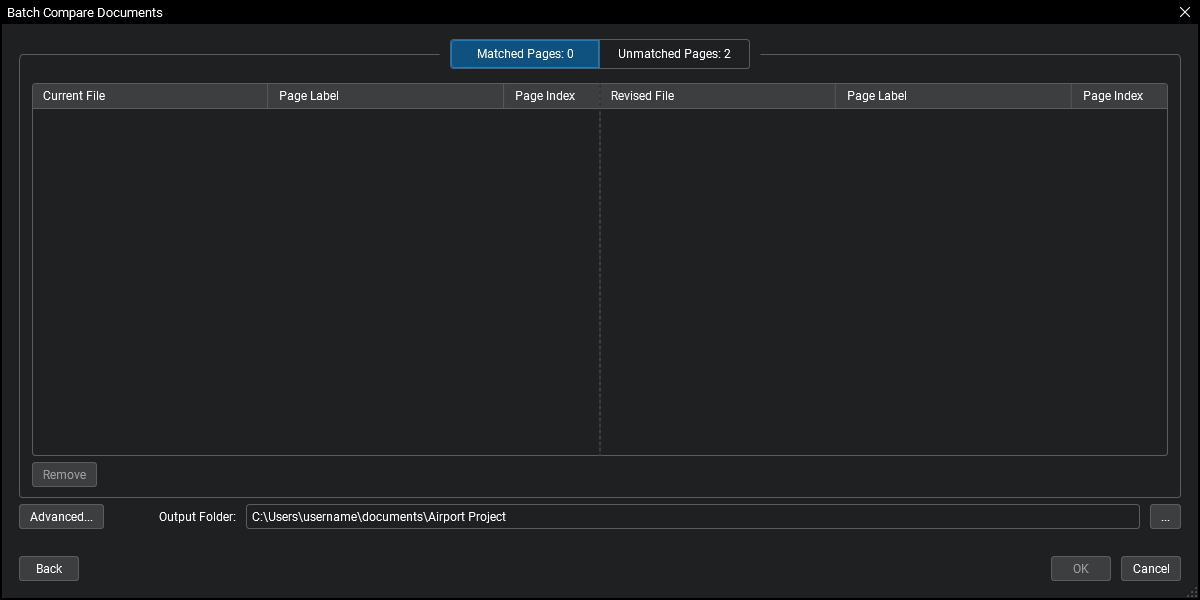
Seiten werden in passenden Paaren angeordnet; Seiten in derselben Reihe gelten als „gepaart“ und werden verglichen. - Um eine Seite mit einer anderen Seite zu verbinden, klicken und ziehen Sie sie an die gewünschte Position.
- Um eine Seite aus einer der Listen zu entfernen, wählen Sie die Datei aus und klicken Sie auf „Entfernen“.
- Um die Vergleichseinstellungen zu ändern, klicken Sie auf Erweitert. Siehe Erweiterte Vergleichsoptionen für weitere Informationen.
- Um den Ordner zu ändern, in dem die Vergleichsdokumente gespeichert werden, klicken Sie auf die
 Schaltfläche rechts neben Ausgabeordner und wählen Sie den gewünschten Ordner aus.
 - Um zum vorherigen Bildschirm zurückzukehren, klicken Sie auf Zurück.
- Klicken Sie auf „OK“, um mit dem nächsten Bildschirm des Assistenten „Stapeldokumentenvergleich“ fortzufahren.Wenn Sie auf dem vorherigen Bildschirm Manuelle Korrelation als Option für Seiten abgleichen nach ausgewählt haben und eine oder mehrere Seiten nicht zugeordnet sind, werden diese automatisch verworfen.

- Überprüfen Sie die bereitgestellten Übersichts informationen, die die verglichenen Seiten, die Anzahl der gefundenen Unterschiede und den Namen des Vergleichsdokuments umfassen, das für jedes Seitenpaar erstellt wurde.
- Gehen Sie wie folgt vor, um einen Bericht über die **Übersichtsinformationen** zu erstellen:
- Wählen Sie Detaillierten Bericht erstellen.
- Wählen Sie unter Format PDF oder CSV.
- Um den Ordner zu ändern, in dem der Bericht gespeichert werden soll, wählen Sie die Schaltfläche rechts von Ausgabeordner und wählen Sie den gewünschten Ordner aus.
- Geben Sie einen Namen für den Bericht in das Feld Dateiname ein.
- Um eine vorhandene Datei mit demselben Namen im ausgewählten Ordner zu überschreiben, wählen Sie Vorhandene Datei überschreiben.
- Um die Datei zu öffnen, sobald sie erstellt wurde, wählen Sie Datei nach Erstellung öffnen.
Gehen Sie zu Einstellungen , um zusätzliche Berichtsoptionen festzulegen. Die verfügbaren Optionen sind je nachdem unterschiedlich, welche Art von Bericht generiert wird:
PDF
- Hyperlinks erstellen: Wenn aktiviert, enthält der Bericht Hyperlinks zu den aktuellen, überarbeiteten und nicht übereinstimmenden Seiten und zur markierten PDF-Datei, die die Unterschiede zwischen ihnen hervorhebt.
- Stempeldatum und Stempelzeit: Wenn aktiviert, werden diese Informationen dem Footer des Berichts hinzugefügt.
- Seitengröße und Ausrichtung: Legt die Seitengröße und Ausrichtung des Berichts fest.
CSV
- Hyperlinks erstellen: Bei Aktivierung enthält der Bericht Hyperlinks zu den aktuellen, überarbeiteten und nicht zugeordneten Seiten.
- Spaltenüberschriften einschließen: Wenn aktiviert, enthält die Datei automatisch generierte Spaltenüberschriften im Vergleichsbericht.
- Klicken Sie auf OK.
Erweiterte Matchoptionen
Mit den erweiterten Übereinstimmungsoptionen können Sie einen benutzerdefinierten Übereinstimmungsfilter definieren, der zum präzisen Abgleich von Seiten während des automatischen Abgleichsprozesses verwendet wird.
Platzhalter-Syntax:
* Repräsentiert null oder mehr Zeichen, die keine Zahl sind # Repräsentiert eine Reihe von Zeichen, die eine Nummer bilden ; Separator zur Spezifizierung mehrerer Filter ??? Stellt eine Reihe alphabetischer Buchstaben dar \ Escape-Charakter, um die oben genannten Charaktere wörtlich zu behandeln Alle anderen Zeichen sind Literalzeichen.
Ein angenommener * Platzhalter steht immer vor der Zeichenfolge. Zum Beispiel, A#; C# wird impliziert als * A#; * C#.Leerzeichen gelten als buchstabengetreue Zeichen. Setze keine Leerstelle nach einem Semikolon, oder der Filter wird sie berücksichtigen.
Erweiterte Vergleichsoptionen
Verwenden Sie die Erweiterten Vergleichsoptionen zum Feinabstimmen des Dokumentenvergleichsprozesses. Bluebeam empfiehlt, dass Sie die bereitgestellten Vergleichs- und Rendering-Einstellungen verwenden und diese Einstellungen nur ändern, wenn der Dokumentenvergleichsprozess keine Unterschiede zu erkennen scheint.
-dialog-box.png)
Revu bietet drei Standard-Vergleichskonfigurationen: Gedruckte Dokumente (gleicher Drucker), Gedruckte Dokumente (unterschiedliche Drucker) und Gescannte Dokumente. Jede Konfiguration enthält vorkonfigurierte Einstellungen. Sie können die Einstellungen beliebiger Standardkonfigurationen ändern oder einen benutzerdefinierten **Typ** erstellen, indem <New Custom> Sie auswählen.
Um die Einstellungen der aktuellen Konfiguration dauerhaft zu ändern, wählen Sie Speichern aus. Geben Sie im Dialogfeld Einstellungen für Dokumentenvergleich speichern einen Namen für diese Konfiguration ein. Wenn Sie die Einstellungen einer Standard- Konfiguration ändern, können Sie sie unter dem standardmäßigen, automatisch ausgefüllten Namen speichern oder Sie können sie ändern und eine neue Konfiguration erstellen.
Revu bietet die folgenden erweiterten Vergleichsoptionen:
Aufschlagoptionen
- Geben Sie bei Bedarf einen Namen für die Differenz-Anmerkungen (zum Beispiel „Differenzen 5-7-14“) im Feld Betreff ein. Durch das Benennen von Anmerkungen können Sie die Anmerkungen in der Markierungsliste leicht nach Betreff gruppieren. Sie können im Laufe der Zeit eine Reihe von Differenzvergleichen erstellen, um einen Änderungsverlauf zu bieten.
- Legen Sie die Farbe, die Füllfarbe, die Deckkraft und die Breite fest, um das Aussehen der Markierungen zu bestimmen, die zur Kennzeichnung der beim Vergleich gefundenen Unterschiede verwendet werden.
- Wenn Cloud-Markierungen verwendet werden sollen, wählen Sie Cloud.
- Wenn die Anmerkungen gesperrt werden sollen, wenn Sie sie platzieren, wählen Sie Gesperrt aus.
Vergleichsoptionen
- Der Vergleichsprozess teilt das Dokument in einen Bereich von Rastern zum Vergleich.
- Rastergröße definiert die Größe der einzelnen Rastersegmente, die zum Vergleich verwendet werden. Diese Regionen werden dann nach verschiedenen Pixeln inspiziert, um als abweichende Region identifiziert zu werden.
- Pixeldichte steuert den Schwellenwert für Unterschiede in einer bestimmten Fläche (definiert durch die Rastergröße) beim Erkennen von Unterschieden.
- Die Farbempfindlichkeit hilft, den Schwellenwert zu bestimmen, bei dem Pixelunterschiede ermittelt werden. Eine niedrigere Empfindlichkeitseinstellung erkennt nicht so viele Unterschiede wie eine höhere Empfindlichkeitseinstellung. Diese Einstellung funktioniert in Verbindung mit der Pixel Proximity Allowance. Erhöhe diesen Wert, um angrenzende Bereiche auf ähnliche Pixel zu überprüfen.
- DPI bestimmt die Auflösung, die zur Rasterisierung der PDFs verwendet wird. Die Standardeinstellung ist 72. Set Sie den Wert höher (144), wenn für den Vergleich eine feinere Auflösung benötigt wird.
- Set Sie den Margin-Wert so ein, dass er die Bereiche rund um die Grenzen der verglichenen PDFs ignoriert.
- Standardmäßig ignoriert das Vergleichswerkzeug vorhandene Markierungen in den Dokumenten, da diese bereits leicht über die Markierungsliste gefunden werden können. Wählen Sie Markierungen einschließen, um dieses Verhalten zu überschreiben und Markierungen zum Vergleich darzustellen.
- Während geglättete Markierungen Teil der Inhaltsebene eines PDF werden, ignoriert das Vergleichswerkzeug standardmäßig diejenigen, die als „wiederherstellbar“ geglättet wurden. Wählen Sie „Geglättete Markierungen einschließen“, um dieses Verhalten zu überschreiben.
Seitenausrichtungsoptionen
- Wählen Sie automatische Ausrichtung, um die Pläne oder Dokumente, die verglichen werden, automatisch auszurichten. Automatische Ausrichtung wird für den Vergleich gescannter Pläne empfohlen.
- Geben Sie Werte in die Offset -Einstellung ein, wenn Sie wissen, dass ein Dokument gegenüber dem verglichenen Dokument versetzt ist.
Um die enthaltenen Typen auf ihre Standardeinstellungen wiederherzustellen, wählen Sie Standardeinstellungen wiederherstellen aus.