測定パネル
 [測定] パネルでは、測定モードへのアクセス、ドキュメントの縮尺と測定精度の設定、同じドキュメント内の複数の縮尺に対するビューポートの設定とクリア、その他の測定オプションの利用が可能です。
ページスケールを設定すると、測定を配置する際に、精度を確保するための主要な測定値のプレビューが右下に表示されます。必要に応じて、X または測定アイコンを選択して非表示にするか、再度表示します。
選択した測定の合計は、マークアップリストおよび動的プロパティツールバーで確認できます。
[ウィンドウ] > [パネル] > [測定] に移動して、[測定] パネルを表示します。
 測定パネルツールバー
測定パネルのツールバーから、測定モードに簡単にアクセスできます。

測定 menu:
-
測定ツールの表示:有効にすると、測定ツールがパネルツールバーに表示されます。無効にすると、これらのツールは非表示になりますが、測定ツールバーおよび [ツール] > [測定] メニューから引き続きアクセスできます。
-
[測定から注釈を作成]:有効にすると、測定がドキュメント上の永続的な注釈として作成されます。無効にすると、測定は一時的なものになります。この機能は、Studio セッション PDF でのみ利用可能です。
-
[直交をスナップ]: 測定を 45 度刻みの角度に制限します。これは、Shift キーを押したままにすることで一時的に有効にできます。
-
スナップ・トゥ・コンテンツ:カーソルを下の線や描画要素にスナップし、2点を正確に選択しやすくします。PDFファイル内のベクターコンテンツにスナップするだけです。画像やスキャンファイルであれば、スナップしません。カーソルがスナップ可能な要素の上にいると、影付きの四角形に変わります。

-
ビューポートの蛍光ペン: 測定ツールが選択されるたびに、ページ上のビューポートが青色で強調表示されます。
 長さ:単一の線形測定値を計算します。
 ポリの長さ:図形や多段線の 全体の長さと各セグメントの長さ を計算します。対応するメニューには、以下のツールも含まれています。
-
 [外周]: 図形または複数セグメントの線の合計外周の長さを計算します。
 面積:単純な四角形または不規則な多角形の面積を計算します。対応するメニューには、以下のツールも含まれています。
-
 [多角形カットアウト] :既存の[面積] または[体積] の測定から 多角形の領域を切り取りまたは減算 します。
 楕円のカットアウト :既存の
 直径:円形の図形の直径を計算します。
 角度:3 点で定義された 角度を測定します。
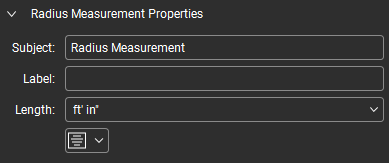
 [半径]: 中心から外側へ説明されているように、半径によって円を測定します。
 3 点半径:円周上の任意の 3 つの点を使用して円を測定します。
 体積:定義された深さを持つ面積の体積を計算します。
 [カウント]: マウスをクリックするたびにマークアップを配置し、配置されるたびに カウントの累計を各マークアップに関連付けます。
 動的塗りつぶし:図面のコンテンツレイヤー上のあらゆる図形から、スペースと測定マークアップを自動的に作成します。
測定パネルのセクション
ページの拡大縮小
ページの縮尺 セクションには、ドキュメントの縮尺と測定精度が表示されます。測定やテイクオフなどの精度を確保するため、縮尺が正しく設定されていることを確認してください。

ここで行った変更は、ページの縮尺が保護されていない限り、変更前に行われたものを含め、図面上のすべての測定に一般的に影響します。この場合、ページの拡大縮小セクションの上部に警告メッセージが表示されます。

ページの縮尺が保護されている場合 (Studio から開いた図面で、セッションまたはプロジェクトからチェックアウトせずに開いた場合に最もよく見られます)、ページ縮尺への変更は以下に説明されている内容とは異なる動作をする可能性があります。詳細については、下記の 保護されたページの縮尺 を参照してください。
ページ:現在のページを表示します。
スケールを他のページにも追加:図面内の他のページに現在のページの縮尺を適用するために使用します。
[縮尺]: ページ縮尺の確認や設定を行うための以下のツールが利用可能です:
-
較正:図面上の既知の長さに合わせてスケールを較正します。この方法は、PDF 作成プロセス中に縮尺エラーが発生していないことを確認できない場合に特に有効です。詳細については、「PDF へのスケールの較正」を参照してください。
-
[プリセット] と[カスタム]: 現在のページの縮尺を設定する際に使用します(縮尺が既に設定されている場合は無視できます)。図面の縮尺が判明しており、PDF 作成プロセス中に縮尺エラーが発生していないことが確実な場合は、自分で縮尺を設定できます(PDF 作成プロセス中に縮尺エラーが発生していないことを確認できない場合は、ページに合わせて縮尺を較正することをお勧めします)。Revu には、最も一般的な縮尺がいくつかプリロードされています。これらを使用するには、[プリセット] を選択し、表示されるメニューから縮尺を選択します。[プリセット] リストにない既知の縮尺を設定するには、[カスタム] を選択し、縮尺定義現場(下記参照)に手動で縮尺を入力します。
-
縮尺の定義:現在の縮尺は (測定 A) = (測定 B) の形式で表示されます。これらは必要に応じて手動で変更できますが、PDF 作成プロセス中に縮尺の問題が発生していないことが確実でない限り、通常は較正を行うことをお勧めします。
-
[+ プリセットを追加]: カスタムおよび較正済みの縮尺をプリセットリストに追加して、このドキュメントや他の図面で後から使用できます。縮尺を設定したら、[+ プリセットを追加] を選択してプリセットリストに保存します。保存された縮尺は、[プリセット] リストの上部に表示されます。
-
Y 軸の分割: 選択して、X 軸および Y 軸の尺度を個別に定義します。縮尺が既に設定されている場合は、それが自動的に X 軸の尺度になります。Y 軸の尺度は上記の方法のいずれかを使用して設定でき、X 軸の尺度の設定に使用したものと同じである必要はありません。
精度:測定値の小数点または分数の精度を定義します。
保護されたページの縮尺
一部の図面のページ縮尺は自動的に保護されます。これは、Studio セッションから開いた図面や、Studio プロジェクトから開いたもののチェックアウトされていない図面で最も一般的に発生しますが、読み取り専用やその他の保護モードになっている図面にも影響する可能性があります。これらのドキュメントの保護ステータスは、[ページ縮尺] セクションの上部に表示されます。

保護された図面の縮尺を変更した場合、新しい縮尺は一時的なものとなり、図面を閉じるとデフォルトのページ縮尺に戻ります。一時的なページ縮尺は、それが有効な間に配置されたマークアップにのみ影響し、ドキュメントが開いている間のみ持続します。一時的な縮尺が有効かどうかは、Revu 周辺の縮尺インジケーター(ここ [測定] パネル、[サムネイル] パネル、ビューポート、および [ナビゲーション] バーなど)が蛍光ペンで強調表示されることで確認できます。以下の例を参照してください。

図面上のすべての測定値(Studio セッションから開いた図面の場合は、すべての測定値)に新しい縮尺を適用するには、再計算を選択して新しい縮尺を処理します。
測定のプロパティ
測定のプロパティセクションには、選択した測定に関連するプロパティが表示されます。すべての測定には件名およびラベルプロパティがあり、測定ツールが選択されていない場合は、これらのみが表示されます。

これらの現場にテキストを入力すると (測定ツールが選択されていない場合)、すべてのツールで保持される [件名] または [ラベル] プロパティのデフォルト値が作成されます。これらの現場が使用できない場合は、[件名とラベルにレガシーを維持する動作を使用する] 基本設定を [測定の基本設定] で選択してください。
さまざまなツールを選択すると、必要に応じてその他のプロパティが表示されます。
 面積
面積

件名: 選択した測定マークアップの件名を定義します。件名は マークアップリスト に報告されます。類似したマークアップに類似した件名を付けると、マークアップリストでの作業が容易になります。
[ラベル] : 選択した測定マークアップのラベルを定義します。ラベルはマークアップリストに報告され、デフォルトではマークアップ自体にも表示されます。
[深さ]:選択した測定の深さを定義します。これは体積と壁面積の計算に使用されます。測定を配置する前(ただし、該当する測定タイプを選択した後)、または既存のマークアップを選択した後に設定できます。
幅: 測定の幅(縮尺)を表示します。ドキュメントの幅については、[プロパティ] タブ の レイアウト セクションを参照してください。
縦: 測定の高さ (縮尺通り) を表示します。ドキュメントの高さについては、[プロパティ] タブ の[レイアウト] セクションを参照してください。
勾配: 測定の勾配比率を記述し、勾配面上の材料を正確に計算できるようにします。勾配を設定するには、その測定単位 (ピッチ、度、またはグレード) を選択し、対応する現場に値を入力します。
長さ:測定の長さ寸法の測定単位を設定します。
面積:測定の面積寸法の測定単位を設定します。
体積:測定の体積寸法の測定単位を設定します。
 [セグメント値を表示]:有効にすると、他のデフォルトの測定値に加えて、測定内の個別のセグメントの測定値が表示されます。メニューから位置合わせオプションを選択して、測定キャプションの位置合わせを決定します。
 キャプションを表示:図面に表示される測定キャプションを決定します。必要なキャプションを選択するか、キャプションを表示 を無効にしてすべてのキャプションをオフにします。
 [重心を表示]:有効にすると、測定の幾何学的中心が表示されます。
個

件名: 選択した測定マークアップの件名を定義します。件名は マークアップリスト に報告されます。類似したマークアップに類似した件名を付けると、マークアップリストでの作業が容易になります。
[ラベル] : 選択した測定マークアップのラベルを定義します。ラベルはマークアップリストに報告され、デフォルトではマークアップ自体にも表示されます。
[深さ]:選択した測定の深さを定義します。これは体積と壁面積の計算に使用されます。測定を配置する前(ただし、該当する測定タイプを選択した後)、または既存のマークアップを選択した後に設定できます。
幅: 測定の幅(縮尺)を表示します。ドキュメントの幅については、[プロパティ] タブ の レイアウト セクションを参照してください。
縦: 測定の高さ (縮尺通り) を表示します。ドキュメントの高さについては、[プロパティ] タブ の[レイアウト] セクションを参照してください。
長さ:測定の長さ寸法の測定単位を設定します。
面積:測定の面積寸法の測定単位を設定します。
体積:測定の体積寸法の測定単位を設定します。
キャプションを表示:図面に表示される測定キャプションを決定します。必要なキャプションを選択するか、キャプションを表示 を無効にしてすべてのキャプションをオフにします。
直径

件名: 選択した測定マークアップの件名を定義します。件名は マークアップリスト に報告されます。類似したマークアップに類似した件名を付けると、マークアップリストでの作業が容易になります。
[ラベル] : 選択した測定マークアップのラベルを定義します。ラベルはマークアップリストに報告され、デフォルトではマークアップ自体にも表示されます。
[深さ]:選択した測定の深さを定義します。これは体積と壁面積の計算に使用されます。測定を配置する前(ただし、該当する測定タイプを選択した後)、または既存のマークアップを選択した後に設定できます。
幅: 測定の幅(縮尺)を表示します。ドキュメントの幅については、[プロパティ] タブ の レイアウト セクションを参照してください。
縦: 測定の高さ (縮尺通り) を表示します。ドキュメントの高さについては、[プロパティ] タブ の[レイアウト] セクションを参照してください。
長さ:測定の長さ寸法の測定単位を設定します。
面積:測定の面積寸法の測定単位を設定します。
体積:測定の体積寸法の測定単位を設定します。
キャプションを表示:図面に表示される測定キャプションを決定します。必要なキャプションを選択するか、キャプションを表示 を無効にしてすべてのキャプションをオフにします。
[重心を表示]:有効にすると、測定の幾何学的中心が表示されます。
動的塗りつぶし
動的塗りつぶしには独自のプロパティはありません。その代わりに、それらは作成に使用された測定のプロパティを持ちます。
長さ

件名: 選択した測定マークアップの件名を定義します。件名は マークアップリスト に報告されます。類似したマークアップに類似した件名を付けると、マークアップリストでの作業が容易になります。
[ラベル] : 選択した測定マークアップのラベルを定義します。ラベルはマークアップリストに報告され、デフォルトではマークアップ自体にも表示されます。
[深さ]:選択した測定の深さを定義します。これは体積と壁面積の計算に使用されます。測定を配置する前(ただし、該当する測定タイプを選択した後)、または既存のマークアップを選択した後に設定できます。
勾配: 測定の勾配比率を記述し、勾配面上の材料を正確に計算できるようにします。勾配を設定するには、その測定単位 (ピッチ、度、またはグレード) を選択し、対応する現場に値を入力します。
長さ:測定の長さ寸法の測定単位を設定します。
面積:測定の面積寸法の測定単位を設定します。
キャプションを表示:図面に表示される測定キャプションを決定します。必要なキャプションを選択するか、キャプションを表示 を無効にしてすべてのキャプションをオフにします。
外周

件名: 選択した測定マークアップの件名を定義します。件名は マークアップリスト に報告されます。類似したマークアップに類似した件名を付けると、マークアップリストでの作業が容易になります。
[ラベル] : 選択した測定マークアップのラベルを定義します。ラベルはマークアップリストに報告され、デフォルトではマークアップ自体にも表示されます。
[深さ]:選択した測定の深さを定義します。これは体積と壁面積の計算に使用されます。測定を配置する前(ただし、該当する測定タイプを選択した後)、または既存のマークアップを選択した後に設定できます。
長さ:測定の長さ寸法の測定単位を設定します。
面積:測定の面積寸法の測定単位を設定します。
[セグメント値を表示]:有効にすると、他のデフォルトの測定値に加えて、測定内の個別のセグメントの測定値が表示されます。メニューから位置合わせオプションを選択して、測定キャプションの位置合わせを決定します。
キャプションを表示:図面に表示される測定キャプションを決定します。必要なキャプションを選択するか、キャプションを表示 を無効にしてすべてのキャプションをオフにします。
ポリの長さ

件名: 選択した測定マークアップの件名を定義します。件名は マークアップリスト に報告されます。類似したマークアップに類似した件名を付けると、マークアップリストでの作業が容易になります。
[ラベル] : 選択した測定マークアップのラベルを定義します。ラベルはマークアップリストに報告され、デフォルトではマークアップ自体にも表示されます。
[深さ]:選択した測定の深さを定義します。これは体積と壁面積の計算に使用されます。測定を配置する前(ただし、該当する測定タイプを選択した後)、または既存のマークアップを選択した後に設定できます。 [深さ] と [上り/下り] は相互に排他的です。
上り/下り: 配管や管など、ある階から次の階へ上下に走る材料を正確に測定できます。ここに入力した値は、上りおよび/または下りの合計量を表し、長さの合計に追加されます。マークアップの上り/下りを設定するには値を入力します。測定単位は、マークアップの長さに使用されているものと同じ単位が自動的に適用されます。上り/下りと深さは、同時に設定することはできません。
長さ:測定の長さ寸法の測定単位を設定します。
面積:測定の面積寸法の測定単位を設定します。
[セグメント値を表示]:有効にすると、他のデフォルトの測定値に加えて、測定内の個別のセグメントの測定値が表示されます。メニューから位置合わせオプションを選択して、測定キャプションの位置合わせを決定します。
キャプションを表示:図面に表示される測定キャプションを決定します。必要なキャプションを選択するか、キャプションを表示 を無効にしてすべてのキャプションをオフにします。
 体積
体積
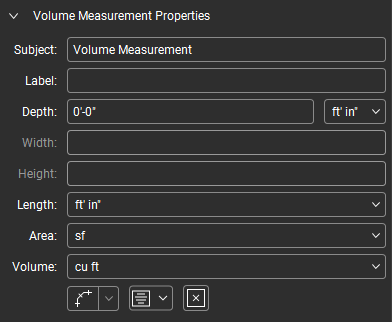
件名: 選択した測定マークアップの件名を定義します。件名は マークアップリスト に報告されます。類似したマークアップに類似した件名を付けると、マークアップリストでの作業が容易になります。
[ラベル] : 選択した測定マークアップのラベルを定義します。ラベルはマークアップリストに報告され、デフォルトではマークアップ自体にも表示されます。
[深さ]:選択した測定の深さを定義します。これは体積と壁面積の計算に使用されます。測定を配置する前(ただし、該当する測定タイプを選択した後)、または既存のマークアップを選択した後に設定できます。
幅: 測定の幅(縮尺)を表示します。ドキュメントの幅については、[プロパティ] タブ の レイアウト セクションを参照してください。
縦: 測定の高さ (縮尺通り) を表示します。ドキュメントの高さについては、[プロパティ] タブ の[レイアウト] セクションを参照してください。
長さ:測定の長さ寸法の測定単位を設定します。
面積:測定の面積寸法の測定単位を設定します。
体積:測定の体積寸法の測定単位を設定します。
[セグメント値を表示]:有効にすると、他のデフォルトの測定値に加えて、測定内の個別のセグメントの測定値が表示されます。メニューから位置合わせオプションを選択して、測定キャプションの位置合わせを決定します。
キャプションを表示:図面に表示される測定キャプションを決定します。必要なキャプションを選択するか、キャプションを表示 を無効にしてすべてのキャプションをオフにします。
[重心を表示]:有効にすると、測定の幾何学的中心が表示されます。